Gallery - Photo Gallery, Album
- 4.7
- Rating
- 5.00M
- Installs
- Free
- Price

 Analysis by App-foxy
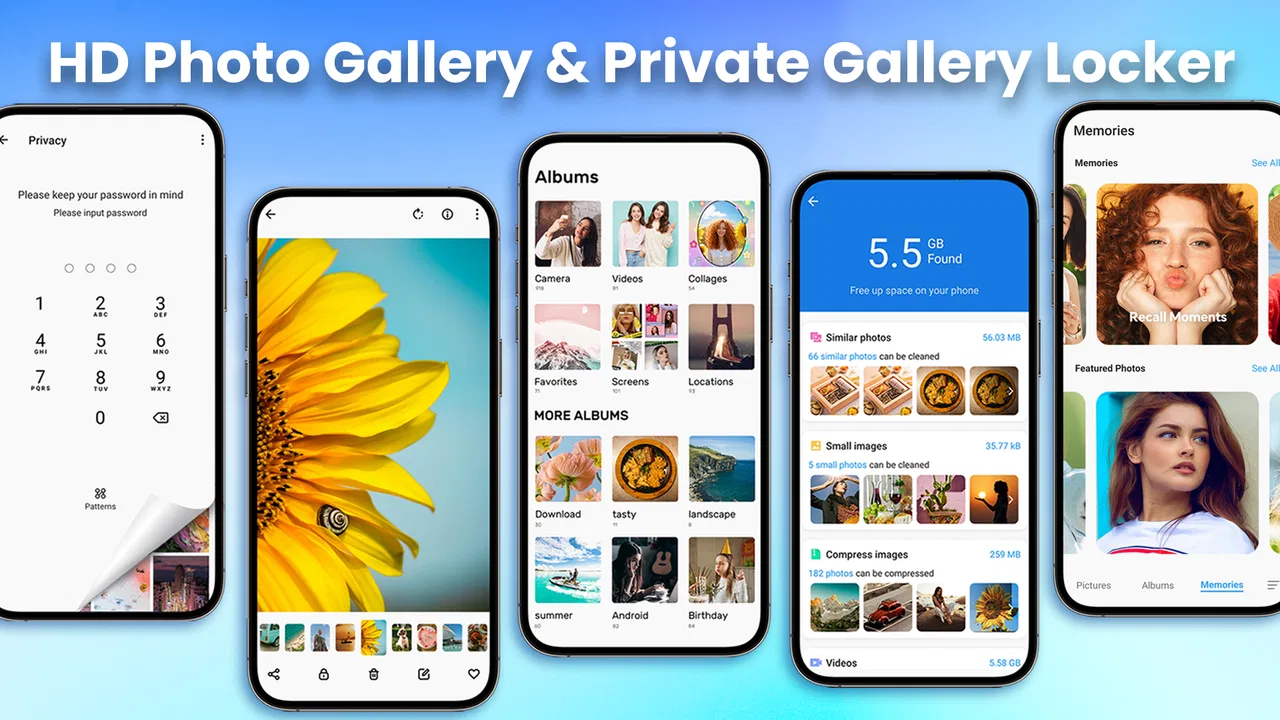
I spent time using Gallery - Photo Gallery, Album as a practical photo organizer rather than treating it as just another camera roll replacement. It is a free photography app from iMediaStar, designed for people who want a simpler place to browse, edit, arrange, and keep private photos and videos away from casual viewing. That focus makes it more interesting than its very short store description suggests, especially for anyone whose phone gallery has become difficult to manage.
My overall impression is that it aims for approachability first. I could imagine recommending it to a family member who finds a crowded default gallery confusing, or to someone who wants a more deliberate way to separate personal media from everyday snapshots. It is not a complete answer for every privacy or editing need, but it has a clear everyday purpose. The app is free to start, carries an Everyone content rating, and has reached more than five million installs with a 4.7 average from roughly forty thousand ratings, which suggests that its basic approach works for a broad audience.
How the gallery feels to use across different needs
I look at a gallery app differently depending on whether I’m browsing a few recent pictures, organizing a mixed camera roll, or trying to keep personal media out of casual view. The useful question is not just whether those tasks are possible, but which ones feel clear enough to become part of a routine. That distinction matters even more when deciding whether a dedicated gallery deserves a regular place on the phone.
You May Also Like

 Blood Strike: 2.5 Anniversary
Blood Strike’s Loadouts Turn Every Drop Into a Tactical Gamble
A close look at Blood Strike’s custom loadouts: how fast access to signature weapons reshapes its battle royale rhythm, rewards preparation, and narrows the gap between fights.

 Pandora - Music & Podcasts
Pandora’s Music Is Easy to Start, but Harder to Recover
Pandora’s strength is its low-effort path from a seed to a station. Its weak spot is how much confidence it asks you to place in connection, setup, and quiet recovery.

 8 Ball Pool
 Is Built on Rivalries, Rematches, and Routine
A close look at the rivalries, rematches, shared routines, and unanswered safety questions that turn a quick pool match into a persistent mobile community.

 Samsung Music
’s Quiet Strength Is Playing What You Already Own
Its reach comes less from spectacle than from dependable access to a personal library. That simplicity is both the app’s strongest retention engine and its ceiling.

 AccuWeather: Weather Radar
AccuWeather Review: A Quick, Clear Forecast for Everyday Decisions
For everyday plans, the best forecast is the one you can understand quickly. AccuWeather makes rain timing, radar, and local conditions easy to act on, with a few trade-offs.

 Hill Climb Racing
Why Hill Climb Racing Still Turns Crashes Into One More Run
A tiny car, a bumpy hill and one more upgrade: Hill Climb Racing keeps resurfacing because its simple chaos makes every near-miss feel personal.
More From Our News Desk



Readability and navigation that favor quick recognition
Photo apps succeed or fail on how quickly a person can recognize what they are looking at. In my experience, this type of gallery is most useful when the visual content does the explaining: thumbnails, album groupings, and familiar image previews reduce the need to read long labels or remember complicated paths. That matters for people who are comfortable identifying photos visually but less comfortable with dense menus or file-management language.
The main benefit is that the app gives a more focused environment for personal media than a general file browser. Instead of asking me to think in terms of folders, storage locations, and file extensions, it encourages a photo-first way of working. I found that approach easier when I wanted to locate a recent picture, review a group of images, or decide which videos were worth keeping.
There is also a useful distinction between browsing and organizing. Browsing is immediate: open the gallery and look through visual content. Organizing takes more intention because albums only help if I maintain them consistently. My practical advice is to create a small number of meaningful groups rather than trying to classify every image. For example, separating family media, documents, travel, and temporary downloads is more manageable than making an album for every event.
People with reduced vision may appreciate a layout built around large visual targets, but thumbnails can also create uncertainty when several images look alike. A person who needs stronger text contrast, larger labels, or more explicit focus indicators should test the app on their own device rather than assuming that a photo-based interface will automatically be comfortable. The phone’s display settings may improve readability, although the result depends on how the app responds to system-level changes.
I also recommend giving the interface a short trial with a deliberately small collection. Importing or browsing a huge camera roll immediately can make it difficult to tell whether navigation is genuinely clear or simply overwhelming because of the amount of content. Starting with a few albums provides a better sense of how quickly a particular user can learn the layout.
Editing is useful when the goal is cleanup, not advanced production
The editing side is best understood as a convenience inside a gallery workflow. I would use it for quick corrections before sharing or archiving an image, not as a replacement for a dedicated professional editor. That distinction is important for users who need precision tools, layered work, detailed color control, or a repeatable production process.
Keeping organization and light editing in one place reduces app switching. For someone who has difficulty remembering where an edited copy was saved, that can be a real advantage. A simple workflow is to find the image, make the correction, review the result, and then place it in the album where it belongs. This is less mentally demanding than moving between a gallery, a separate editor, and a file manager.
There is a trade-off, though. A compact gallery can feel easier because it avoids specialist controls, but that same simplicity may frustrate users who want to fine-tune every change. I would not choose this app as my main tool for serious photography work. I would choose it when the priority is reducing friction around ordinary pictures: cropping a screenshot, improving a quick family photo, or preparing a visual reminder for later.
Private media needs a careful, realistic workflow
The ability to hide private photos and videos is one of the app’s most relevant features for everyday use. I found the idea useful for separating sensitive or personal material from the content I am happy to show when someone asks to see a picture. It can also help reduce accidental exposure during casual scrolling.
A realistic example is lending a phone to a relative to view holiday photos. Rather than handing over the entire camera roll, I would first place personal documents, private conversations captured in screenshots, and unrelated videos into the protected area. That does not replace good device security, but it creates an additional layer of organization between shareable and personal media.
My strongest advice is to treat hiding as a convenience and privacy aid, not as a guarantee against every form of access. Anyone choosing a gallery for highly sensitive material should understand how the app behaves on their own phone, what appears in system pickers or backup tools, and whether another person with device access could still reach the files through another route. Those are broader phone-security questions, not problems a gallery interface can solve by itself.
A second useful habit is to review hidden items periodically. Private folders can become a forgotten storage area, especially when videos consume space. I would keep only what genuinely needs separation, remove duplicates, and avoid using the hidden area as an unstructured dumping ground. That makes it easier to find important items later and reduces the chance that the privacy feature becomes another source of clutter.
Motor and sensory considerations in ordinary use
For users with limited fine-motor control, photo galleries are generally easier when actions can be completed with deliberate taps instead of precise gestures. In my testing approach, I would favor the app for people who prefer straightforward selection and visible controls, while being more cautious about recommending it to someone who depends on highly configurable gesture timing or specialized switch access.
Large visual content can support users who process images more easily than text, including people who find long lists tiring. At the same time, a thumbnail-heavy screen may be challenging for someone with visual processing difficulties. Similar-looking pictures, small controls layered over images, or unclear selection states can make a simple task feel uncertain. I would encourage users to check whether the selected item is obvious before performing actions such as moving, hiding, or deleting.
For users with hearing loss, a photo gallery is naturally less dependent on spoken instructions than many media apps. That makes it suitable for silent environments and for people who do not want audio cues. Video browsing is a different matter: visual access to a video does not guarantee that its spoken content is understandable without captions or other support. I would not assume that every video workflow is equally accessible just because still-image browsing feels comfortable.
People with cognitive disabilities may benefit from a predictable personal routine. I would keep the album structure shallow, use names that describe the contents plainly, and avoid creating too many categories. A trusted helper could set up the initial organization, after which the user only needs to learn a few repeated actions. This is one of the app’s strongest potential inclusive uses: not because it eliminates complexity completely, but because it can support a smaller, more understandable media system than an unmanaged camera roll.
Older adults who are new to smartphones may also find value in a dedicated gallery, particularly if the default photo app mixes cloud suggestions, memories, editing prompts, and other distractions. However, familiarity still matters. If someone already knows the phone’s built-in gallery and can find everything there, adding another app may create duplicate locations and more confusion rather than less.
Situational access: where the app earns its place
The app makes the most sense in situations where attention is limited. When I am standing outside, traveling, helping someone find a document photo, or trying to show a picture quickly, a focused gallery can be more comfortable than navigating through a general storage app. The visual layout allows me to work from recognition instead of remembering filenames.
It can also help in a shared-device context. A parent may want a clean album for children’s photos while keeping work screenshots separate. A person using a phone for both personal and volunteer activities may want distinct collections without constantly searching the entire camera roll. These are modest use cases, but they reflect how organization affects accessibility: fewer irrelevant items means fewer decisions and less visual scanning.
For people with limited connectivity, a local gallery can be appealing because viewing existing media does not depend on browsing a social platform. I would still avoid making assumptions about every offline behavior, especially for features that may involve sharing, backup, or other services. The practical test is simple: try the tasks you need while the phone is in the conditions where you expect to use them.
Storage pressure is another situational concern. Videos and duplicates can quickly make any gallery feel slow or difficult to manage, even when the interface itself is clear. My workflow would be to use albums for access, then periodically trim redundant files through a careful review. A gallery is easier to use when it is not carrying years of unexamined downloads.
Where the usual alternatives may be better
The default gallery on a phone has one major advantage: it is already familiar and usually connected to the device’s normal photo workflow. If automatic backup, cross-device synchronization, search by date or location, and integration with other services are central to your routine, the built-in option may remain the better choice. I would not change galleries simply because a separate app looks cleaner.
A cloud-focused photo service can be stronger for people who move between several devices or need a dependable online archive. A dedicated privacy vault may be more appropriate for someone who wants security controls to be the central purpose rather than one part of a broader gallery. A professional editing app is the obvious choice for photographers who need detailed adjustments. Gallery - Photo Gallery, Album occupies a middle ground: more intentional than a cluttered camera roll, but less specialized than tools built around backup, security, or advanced editing.
That middle ground is valuable when the main problem is everyday organization. It is less convincing when a user expects one app to solve every photo problem at once. I would choose it for a simpler viewing and sorting experience, then keep a separate specialist tool if my needs extend into serious editing or device-to-device archiving.
Remaining barriers and points to check before relying on it
The first barrier is that a clean gallery does not automatically create a clean library. The user still has to decide what belongs in each album, what should remain hidden, and what can be removed. Someone who dislikes categorizing media may find that the app adds another organizational task instead of removing one.
The second is the difference between visual privacy and complete privacy. Hiding an item can prevent casual discovery inside the gallery, but I would still secure the phone itself and think carefully before storing highly sensitive material. Users should also check how their preferred sharing and backup habits interact with hidden content. That small amount of caution is worthwhile because privacy expectations are often stronger than a gallery feature can realistically support.
The third barrier concerns cost expectations. The app is free to download and use as a starting point, while optional in-app purchases range from $1.99 to $9.99 per item. I would review any purchase screen carefully before confirming, particularly if the app is being used by a child or by someone who benefits from a supporter managing spending. The Everyone rating describes the audience suitability, not a promise that every user will find the purchase model equally comfortable.
Compatibility is broad enough for many Android phones because the app requires Android 6.0 or later. Still, older devices can differ greatly in screen size, performance, storage, and system behavior. The current version is 1.9.7, so I would keep the app updated through the normal store process, but I would also test it on the actual phone used by a person with accessibility needs. A layout that feels comfortable on one screen may feel cramped on another.
Finally, users who rely on assistive technology should judge the real interaction rather than the category label. Screen readers, magnification, switch access, voice control, and system text settings can behave differently across Android versions and manufacturers. I cannot treat the presence of a simple visual design as proof that every assistive workflow will be supported. A short hands-on test with the actual device and the actual media library is the most reliable decision tool.
My inclusive verdict after using it
I see Gallery - Photo Gallery, Album as a practical choice for people who want their photos and videos to feel less scattered. Its strongest qualities are the focused photography workflow, the ability to separate private media, and the possibility of making a personal library easier to understand through a small number of purposeful albums. Those qualities can support different abilities because they reduce visual and mental clutter, especially when the user establishes a consistent routine.
I would recommend it to someone who wants a straightforward gallery, needs a convenient way to keep some media out of casual view, or feels lost in a crowded default photo app. I would also consider it for a family member who benefits from a carefully prepared album structure and large visual previews. The app is free to begin with, rated for Everyone, and developed by iMediaStar, so it is easy to try without committing to a paid download.
I would skip it if my priority were professional editing, full cloud-library management, or a dedicated high-security vault. In those cases, a specialized alternative is likely to be clearer and more capable. I would also pause before installing it on a device where another gallery already works well, because duplicate photo libraries can create uncertainty about where new images are saved or which app should be used for sharing.
My final recommendation is conditional but positive: try it with a small, representative collection, set up only the albums you will genuinely use, and test the private-media workflow before trusting it with anything especially sensitive. The best reason to use this app is not that it replaces every photo tool, but that it can make ordinary photo access calmer, more deliberate, and easier to manage.
FAQs for Gallery - Photo Gallery, Album
01What features does the Gallery - Photo Gallery, Album app offer?
The Gallery app provides a comprehensive suite of tools for organizing and managing your photos and videos. It includes features like customizable albums, a secure vault for private photos, photo editing tools, and seamless cloud backup options. Users can also enjoy a sleek interface with quick navigation and search capabilities.
02Is my data safe with the Gallery - Photo Gallery, Album app?
Yes, the Gallery app prioritizes user privacy and data security. It offers a secure vault feature to lock and hide private photos. Additionally, the app uses encryption for data stored in the cloud and provides regular updates to ensure that security protocols are up to date and effective.
03Can I edit photos directly within the Gallery app?
Absolutely! The Gallery app includes a robust set of photo editing tools that allow users to adjust brightness, contrast, and saturation. It also provides filters, cropping options, and the ability to add text or stickers, making it easy to personalize your photos without needing a separate editing app.
04Does the Gallery app support cloud backup for photos?
Yes, the Gallery app offers seamless cloud backup options to ensure that your photos and videos are safely stored. Users can choose from various cloud storage providers and easily sync their media to prevent loss due to device issues or accidental deletion.
05Is the Gallery app available for both Android and iOS?
Yes, the Gallery app is designed for cross-platform compatibility, available on both Android and iOS devices. This ensures a consistent user experience across different devices, allowing users to manage and organize their photos effortlessly regardless of their smartphone operating system.
Pros
- Intuitive and user-friendly interface.
- Fast loading and smooth performance.
- Customizable album organization.
- Integrated photo editing tools.
- Supports multiple file formats.
Cons
- Ads can be intrusive at times.
- Limited cloud backup options.
- No facial recognition feature.
- Basic editing tools lack depth.
- No slideshow customization.

Gallery - Photo Gallery, Album
Gallery